
База на знаења
How to Change the Language of a Plesk Panel Испечати
Follow these steps to change the language of the Plesk Panel.
1. Log in to your Plesk account.
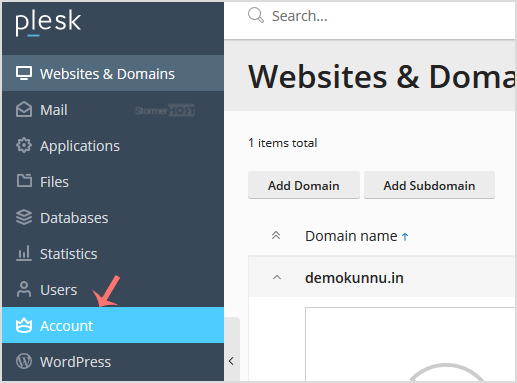
2. Click on Account from the Sidebar Menu.
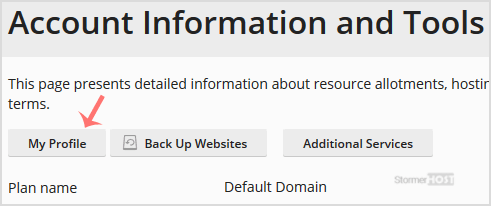
3. Click on My Profile.
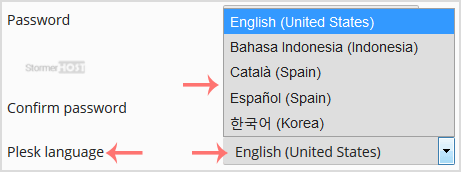
4. Scroll down to the Plesk language and choose the appropriate language from the drop-down menu.
5. Click Apply.

The language in your Plesk account has been successfully changed.
Дали Ви помогна овој одговор?
Понудени резултати
How to Edit a File in the Plesk File Manager
Learn how to edit a file directly in the Plesk File Manager. This is useful for making quick...
Learn how to edit a file directly in the Plesk File Manager. This is useful for making quick...
How to Log in to Plesk
A tutorial on how to access the Plesk Control Panel. After you place an order and make a...
A tutorial on how to access the Plesk Control Panel. After you place an order and make a...
How to Change the Password of a Plesk Account
Follow these steps to change your Plesk account password. 1. Log in to your Plesk account....
Follow these steps to change your Plesk account password. 1. Log in to your Plesk account....
How to Reset a Plesk's Account Password
Follow these steps to reset your Plesk account password. 1. Open your Plesk login URL. 2....
Follow these steps to reset your Plesk account password. 1. Open your Plesk login URL. 2....
How to Update a Plesk Account's Email Address
Follow these steps to change your Plesk contact email address. 1. Log in to your Plesk...
Follow these steps to change your Plesk contact email address. 1. Log in to your Plesk...
