
Base de connaissances
How to Update a Plesk Account's Email Address Imprimer cet article
Follow these steps to change your Plesk contact email address.
1. Log in to your Plesk account.
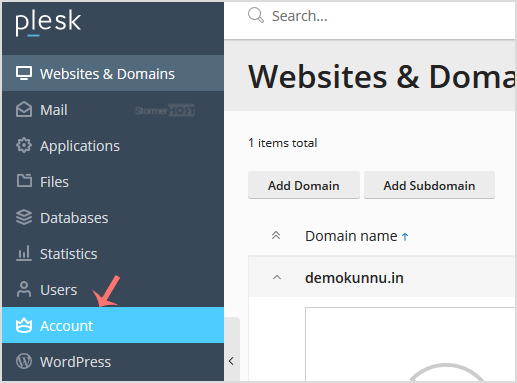
2. Click on Account from the Sidebar Menu.
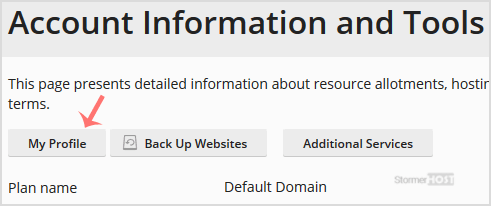
3. Click on My Profile.
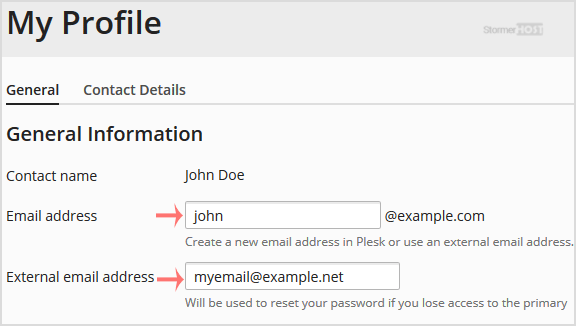
4. Enter the new primary email address in the Email Address field. Choose the appropriate domain from the drop-down menu if you have multiple domains. You can also update the external email address which is used for the password reset.
5. Click on Apply.

You will see a success message signifying that your Plesk contact email address has changed.
Cette réponse était-elle pertinente ?
Articles connexes
How to Edit a File in the Plesk File Manager
Learn how to edit a file directly in the Plesk File Manager. This is useful for making quick...
Learn how to edit a file directly in the Plesk File Manager. This is useful for making quick...
How to Log in to Plesk
A tutorial on how to access the Plesk Control Panel. After you place an order and make a...
A tutorial on how to access the Plesk Control Panel. After you place an order and make a...
How to Change the Password of a Plesk Account
Follow these steps to change your Plesk account password. 1. Log in to your Plesk account....
Follow these steps to change your Plesk account password. 1. Log in to your Plesk account....
How to Reset a Plesk's Account Password
Follow these steps to reset your Plesk account password. 1. Open your Plesk login URL. 2....
Follow these steps to reset your Plesk account password. 1. Open your Plesk login URL. 2....
How to Change the Language of a Plesk Panel
Follow these steps to change the language of the Plesk Panel. 1. Log in to your Plesk...
Follow these steps to change the language of the Plesk Panel. 1. Log in to your Plesk...
