
Preguntes Freqüents - FAQ
How to Add a Subdomain in Plesk Imprimeix aquest Article
In this tutorial, you will learn how to add a subdomain in Plesk. Subdomains help you create different parts of your website, like blog.example.com.
1. Log in to your Plesk account.
2. Click on Websites & Domains from the Sidebar Menu.

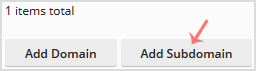
3. Click on Add Subdomain.
4. Enter a subdomain name and select a domain from the Domain field.
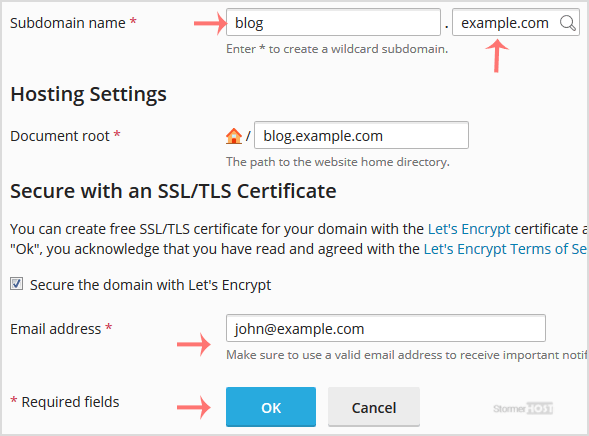
5. Click OK.
Once your Subdomain is added, you can manage it from Websites & Domains.
Ha estat útil la resposta?
Articles Relacionats
How to Add a New Domain in Plesk
Follow this tutorial to add a new domain to your Plesk account. 1. Log in to your Plesk...
Follow this tutorial to add a new domain to your Plesk account. 1. Log in to your Plesk...
How to Remove a Domain in Plesk
You can remove a domain in Plesk by following this tutorial. 1. Log in to your Plesk account....
You can remove a domain in Plesk by following this tutorial. 1. Log in to your Plesk account....
How to Remove a Subdomain in Plesk
A subdomain is an additional part of your primary domain. Please, follow this tutorial to remove...
A subdomain is an additional part of your primary domain. Please, follow this tutorial to remove...
How to Redirect a Subdomain to an External URL in Plesk
Learn how to set up a subdomain redirect in Plesk. This method works for pointing subdomains to...
Learn how to set up a subdomain redirect in Plesk. This method works for pointing subdomains to...
How to Remove a Subdomain Redirect in Plesk
In this tutorial, you will learn how to remove a subdomain redirect in Plesk. This is useful when...
In this tutorial, you will learn how to remove a subdomain redirect in Plesk. This is useful when...
