
Hjälpcentral
How to Remove a Redirect From Your Website Using DirectAdmin Skriv ut denna artikeln
You can easily remove it if you have previously created a redirect in DirectAdmin.
1. Log in to your DirectAdmin Account.
2. In the Account Manager section, click on Site Redirection. Alternatively, type Site Redirection in the search bar, and the option will appear. Click on it.
3. Under Local URL Path, select the redirect entry you want to remove.
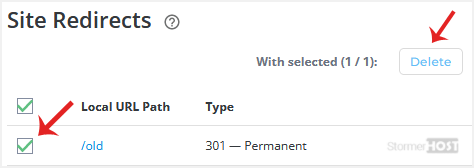
4. Click on Delete. Confirm with Delete again.
A redirect will be removed.
Hjälpte svaret dig?
Relaterade artiklar
How to Create a Domain Pointer in DirectAdmin
You can use your additional domain and point it to the root of your primary site. If your primary...
You can use your additional domain and point it to the root of your primary site. If your primary...
How to Remove a Domain Pointer in DirectAdmin
In this tutorial, you will learn how to remove a domain pointer in DirectAdmin. This can be...
In this tutorial, you will learn how to remove a domain pointer in DirectAdmin. This can be...
How to Create a Domain Alias in DirectAdmin
With a domain alias, you can access old.example.com on new.example.com. 1. Log in to your...
With a domain alias, you can access old.example.com on new.example.com. 1. Log in to your...
How to Remove a Domain Alias in DirectAdmin
In this tutorial, you will learn how to remove a domain alias in DirectAdmin. This is useful when...
In this tutorial, you will learn how to remove a domain alias in DirectAdmin. This is useful when...
How to Add a Subdomain in DirectAdmin
A subdomain is an additional part of your primary domain. For example, blog.example.com is a...
A subdomain is an additional part of your primary domain. For example, blog.example.com is a...
