
Archivio Domande
How to Add a Subdomain in DirectAdmin Stampa Articolo
A subdomain is an additional part of your primary domain. For example, blog.example.com is a subdomain. Please, follow this tutorial to create a subdomain in DirectAdmin.
1. Log in to your DirectAdmin Account.
2. In the Account Manager section, click on Subdomain Management. Alternatively, type Subdomain Management in the search bar, and the option will appear. Click on it.
3. Click on Add Subdomain. You will find it on the top right.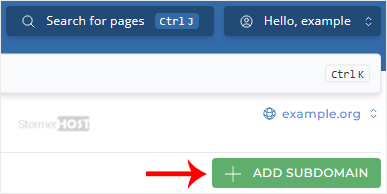
4. Under Subdomain, enter the Subdomain name you want to create. Leave all other options as they are.

5. Click on Add Subdomain.
You should see a success message that the subdomain has been created.
Hai trovato utile questa risposta?
Articoli Correlati
How to Create a Domain Pointer in DirectAdmin
You can use your additional domain and point it to the root of your primary site. If your primary...
You can use your additional domain and point it to the root of your primary site. If your primary...
How to Remove a Domain Pointer in DirectAdmin
In this tutorial, you will learn how to remove a domain pointer in DirectAdmin. This can be...
In this tutorial, you will learn how to remove a domain pointer in DirectAdmin. This can be...
How to Create a Domain Alias in DirectAdmin
With a domain alias, you can access old.example.com on new.example.com. 1. Log in to your...
With a domain alias, you can access old.example.com on new.example.com. 1. Log in to your...
How to Remove a Domain Alias in DirectAdmin
In this tutorial, you will learn how to remove a domain alias in DirectAdmin. This is useful when...
In this tutorial, you will learn how to remove a domain alias in DirectAdmin. This is useful when...
How to Remove Subdomain in DirectAdmin
A subdomain is an additional part of your primary domain. Please, follow this tutorial to remove...
A subdomain is an additional part of your primary domain. Please, follow this tutorial to remove...
