
База знаний
How to Create a Domain Alias in DirectAdmin Распечатать статью
With a domain alias, you can access old.example.com on new.example.com.
1. Log in to your DirectAdmin Account.
2. In the Account Manager section, click on Domain Pointers. Alternatively, type Domain Pointers in the search bar, and the option will appear. Click on it.
3. Click on Create Domain Pointer. You will find it on the top right.
4. Under Source Domain, enter your domain pointer name.
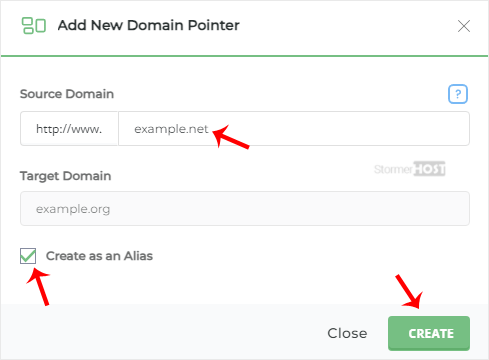
5. Make sure that Create as an Alias is check-marked.
6. Click on Create.
Your domain alias will be successfully created.
Помог ли вам данный ответ?
Связанные статьи
How to Create a Domain Pointer in DirectAdmin
You can use your additional domain and point it to the root of your primary site. If your primary...
You can use your additional domain and point it to the root of your primary site. If your primary...
How to Remove a Domain Pointer in DirectAdmin
In this tutorial, you will learn how to remove a domain pointer in DirectAdmin. This can be...
In this tutorial, you will learn how to remove a domain pointer in DirectAdmin. This can be...
How to Remove a Domain Alias in DirectAdmin
In this tutorial, you will learn how to remove a domain alias in DirectAdmin. This is useful when...
In this tutorial, you will learn how to remove a domain alias in DirectAdmin. This is useful when...
How to Add a Subdomain in DirectAdmin
A subdomain is an additional part of your primary domain. For example, blog.example.com is a...
A subdomain is an additional part of your primary domain. For example, blog.example.com is a...
How to Remove Subdomain in DirectAdmin
A subdomain is an additional part of your primary domain. Please, follow this tutorial to remove...
A subdomain is an additional part of your primary domain. Please, follow this tutorial to remove...
