
Base de conocimientos
How to Remove a Domain Pointer in DirectAdmin Imprimir este artículo
In this tutorial, you will learn how to remove a domain pointer in DirectAdmin. This can be helpful if you no longer need the pointer or want to remove unused domains.
1. Log in to your DirectAdmin Account.
2. In the Account Manager section, click on Domain Pointers. Alternatively, type Domain Pointers in the search bar, and the option will appear. Click on it.
3. Under Domain Pointers, select the domain pointer you want to remove.
4. Click Delete, then confirm the deletion.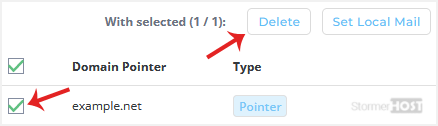
Your domain pointer should have been deleted successfully.
¿Le ha resultado útil esta respuesta?
Artículos relacionados
How to Create a Domain Pointer in DirectAdmin
You can use your additional domain and point it to the root of your primary site. If your primary...
You can use your additional domain and point it to the root of your primary site. If your primary...
How to Create a Domain Alias in DirectAdmin
With a domain alias, you can access old.example.com on new.example.com. 1. Log in to your...
With a domain alias, you can access old.example.com on new.example.com. 1. Log in to your...
How to Remove a Domain Alias in DirectAdmin
In this tutorial, you will learn how to remove a domain alias in DirectAdmin. This is useful when...
In this tutorial, you will learn how to remove a domain alias in DirectAdmin. This is useful when...
How to Add a Subdomain in DirectAdmin
A subdomain is an additional part of your primary domain. For example, blog.example.com is a...
A subdomain is an additional part of your primary domain. For example, blog.example.com is a...
How to Remove Subdomain in DirectAdmin
A subdomain is an additional part of your primary domain. Please, follow this tutorial to remove...
A subdomain is an additional part of your primary domain. Please, follow this tutorial to remove...
