
Tudásbázis
How to Unsuspend cPanel User From WHM Account Kinyomtatja ezt a cikket
You can unsuspend cPanel accounts from WHM. Follow this tutorial to unsuspend your cPanel user.
1. Log in to your WHM Account.
2. Go to Account Functions >> Manage Account Suspension or type Manage Account in the menu filter box. The option will appear. Click on it.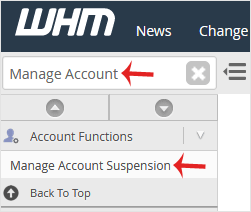
3. Select the suspended user or domain you wish to unsuspend, then click Continue to proceed.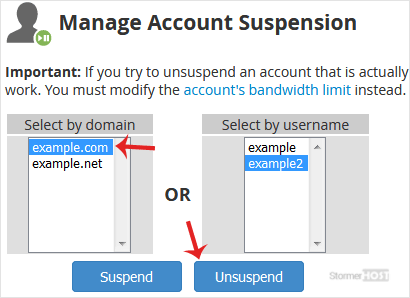
4. Finally, click on Unsuspend.
The account will be unsuspended, or an error message will be displayed in case of any problem.
Hasznosnak találta ezt a választ?
Kapcsolódó cikkek
How to Set Custom/Private Nameservers in WHM
You can set up custom/private nameservers from WHM. 1. Log in to WHM Account. 2. Go to Server...
You can set up custom/private nameservers from WHM. 1. Log in to WHM Account. 2. Go to Server...
How to Create/Add a Package in the WHM
You can create predefined packages in the WHM for automation or another purpose.1. Log in to your...
You can create predefined packages in the WHM for automation or another purpose.1. Log in to your...
How to Edit a Hosting Package in WHM
You can edit the hosting package of your account. With root access, you can edit the packages of...
You can edit the hosting package of your account. With root access, you can edit the packages of...
How to Delete a Package in WHM
You can remove the hosting package of your account, or, should you have root access, you can also...
You can remove the hosting package of your account, or, should you have root access, you can also...
How to Create a Feature List in WHM
You can create a feature list from your WHM Account. Feature lists allow you to provide a...
You can create a feature list from your WHM Account. Feature lists allow you to provide a...
