
مرکز آموزش
How to Create a Feature List in WHM پرینت این مقاله
You can create a feature list from your WHM Account. Feature lists allow you to provide a customized plan with specific features only.
1. Log in to your WHM Account.
2. Go to Packages >> Feature Manager or type Feature Manager in the menu filter box. The option will appear. Click on it.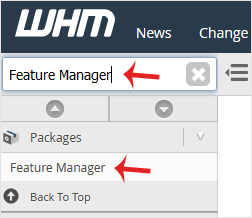
3. In Add a new feature list field, enter the name of your feature list and click on Add Feature List.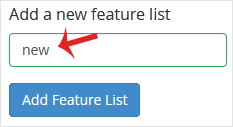
4. Select the options you wish added to your feature list or check-mark the Select all features option to enable all features. Then click on Save.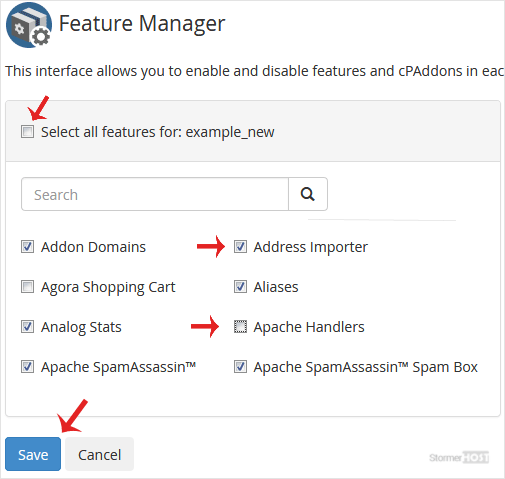
Congratulations, you have successfully created your feature list.
آیا این پاسخ به شما کمک کرد؟
مقالات مربوطه
How to Set Custom/Private Nameservers in WHM
You can set up custom/private nameservers from WHM. 1. Log in to WHM Account. 2. Go to Server...
You can set up custom/private nameservers from WHM. 1. Log in to WHM Account. 2. Go to Server...
How to Create/Add a Package in the WHM
You can create predefined packages in the WHM for automation or another purpose.1. Log in to your...
You can create predefined packages in the WHM for automation or another purpose.1. Log in to your...
How to Edit a Hosting Package in WHM
You can edit the hosting package of your account. With root access, you can edit the packages of...
You can edit the hosting package of your account. With root access, you can edit the packages of...
How to Delete a Package in WHM
You can remove the hosting package of your account, or, should you have root access, you can also...
You can remove the hosting package of your account, or, should you have root access, you can also...
How to Enable/Disable Features of cPanel Account From WHM
You can enable/disable features of your customers' cPanel account from WHM. Follow this tutorial...
You can enable/disable features of your customers' cPanel account from WHM. Follow this tutorial...
