
Preguntes Freqüents - FAQ
How to Forcefully or Gracefully Shut Down the VPS in SolusVM 1 Imprimeix aquest Article
You can shut down the VPS in two ways - forcefully or gracefully in SolusVM 1.
How to Gracefully shut down the VPS in SolusVM 1?
1. Log in to your SolusVM 1 Control Panel.
2. If you have multiple VPSs, select the appropriate one.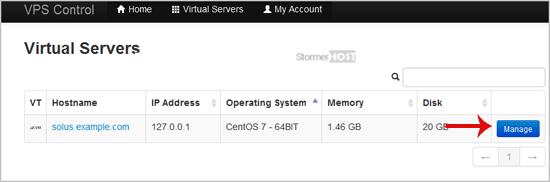
3. Click on Shutdown.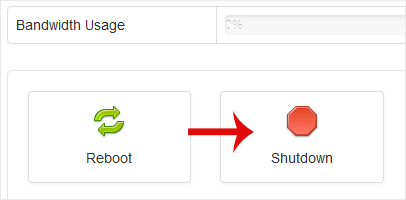
4. Click Yes to confirm.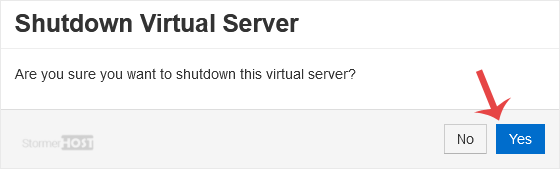
It may take some time for the VPS to shut down. Then, it will display a message.
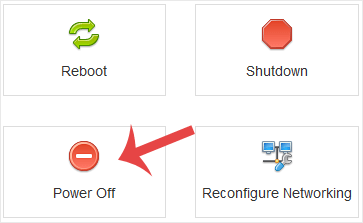
For forceful shutdown, you can click the Power Off option in SolusVM 1.
How to shut down the VPS via the Command Line?
(This option is similar to pulling the power cord from your computer, and there is a chance for data loss.)
1. Log in to your SSH Client.
2. Enter the following command:
poweroff
The VPS will shut down as soon as the command is executed.
Ha estat útil la resposta?
Articles Relacionats
How to Reboot/Restart VPS in SolusVM 1
You can restart VPS via the command line or SolusVM 1. How to Reboot/Restart a VPS via SolusVM...
You can restart VPS via the command line or SolusVM 1. How to Reboot/Restart a VPS via SolusVM...
How to Start/Boot Your VPS in SolusVM 1
If your VPS is down/offline, you can start it using SolusVM 1.1. Log in to your SolusVM 1 Control...
If your VPS is down/offline, you can start it using SolusVM 1.1. Log in to your SolusVM 1 Control...
How to Access VPS via VNC in SolusVM 1
You can access your VPS via VNC in an emergency, such as when a firewall blocks your IP, the...
You can access your VPS via VNC in an emergency, such as when a firewall blocks your IP, the...
How to Reinstall OS Using SolusVM 1 OS-Reinstaller
You can easily Install/Reinstall the operating system using SolusVM 1. However, note that this...
You can easily Install/Reinstall the operating system using SolusVM 1. However, note that this...
How to Enable Disable APIC, ACPI, VNC in SolusVM 1
SolusVM 1 allows you to enable or disable VNC, PAE, APIC, and ACPI.1. Log in to your SolusVM 1...
SolusVM 1 allows you to enable or disable VNC, PAE, APIC, and ACPI.1. Log in to your SolusVM 1...
