
Base de conocimientos
How to Enable or Disable Mod Security in cPanel Imprimir este artículo
Are you facing the issue of IP getting blocked repeatedly? If the answer is Yes, then it may have happened due to Mod Security.
What is Mod Security?
ModSecurity is a module that protects your website from various types of attacks. Mod Security protects a website from hackers, brute force attacks, cross-site request forgery(CSRF), and many other threats. Although it sometimes creates a problem, we do not recommend you to disable it but instead fix your software's vulnerability.
Disabling ModSecurity can help you determine whether ModSecurity blocks your IP or not. However, if your IP is blocked for a different reason, then contact us. We will find the exact reason behind it in order to resolve your issue so that you will not be required to disable the module.
How to Enable or Disable Mod Security in cPanel?
1. Log in to your cPanel account.
2. In the Security section, click on ModSecurity.
3. If ModSecurity is enabled, it shows the Disable option. Click it to disable ModSecurity on all domains. The next time you want to enable it, click on Enable to enable it on all domains.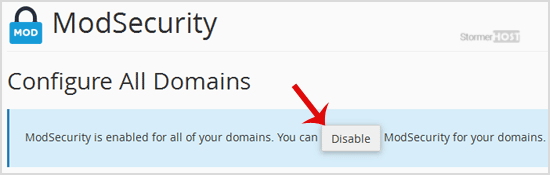
How to disable ModSecurity only on selected domains?
You may have multiple domains, and you would want to disable or enable ModSecurity on selected domains.
1. Log in to cPanel, and from the Security section, click on ModSecurity.
2. Scroll down to the bottom of the page.
3. Under the Status option, next to the domain, click on On or Off.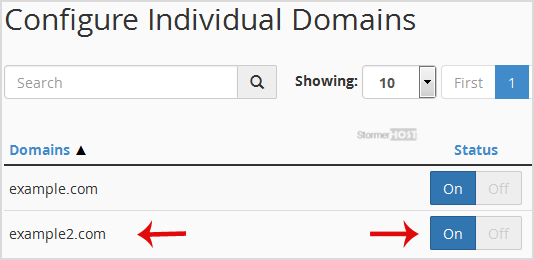
Hope you found this tutorial helpful.
¿Le ha resultado útil esta respuesta?
Artículos relacionados
You can lock a directory with a password using the cPanel's Directory Privacy. 1. Log in to your...
You can blacklist an IP Address to deny access to your website.1. Log in to your cPanel account....
External websites may display your website images on their websites, thus stealing your...
If you want to block an IP Address, you can add the below lines to your htaccess file. order...
For security purposes, you should disable directory browsing on your website so no one can see...
