
Databáze řešení
How to Delete an Uncategorized Category in WordPress Tisknout tento článek
You cannot remove the Uncategorized category, but you can rename it.
1. Log in to the WordPress dashboard.
2. From the Dashboard menu, go to Posts and click on Categories.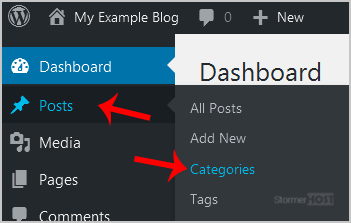
3. Hover your mouse on the Uncategorized option and click on Quick Edit.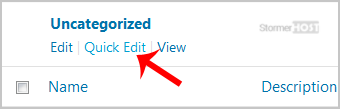
4. Change its name and slug, and confirm with Update Category.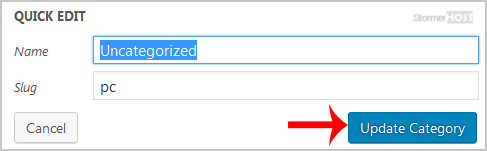
The Uncategorized category has been successfully renamed.
Byla tato odpověď nápomocná?
Související články
How to Access the WordPress Admin Dashboard
WordPress is an easy to work with CMS software. To access a WordPress account, please follow...
WordPress is an easy to work with CMS software. To access a WordPress account, please follow...
How to Remove Sample Comments and Posts From WordPress
You get sample comments and posts in a fresh WordPress install. You can easily remove them in the...
You get sample comments and posts in a fresh WordPress install. You can easily remove them in the...
How to Write and Publish Your First Blog Post in WordPress
Writing your first blog post is a fascinating thing. Follow the steps below to do so in...
Writing your first blog post is a fascinating thing. Follow the steps below to do so in...
How to Remove a Post in WordPress
You can remove the published or draft post in WordPress.1. Log in to the WordPress dashboard. 2....
You can remove the published or draft post in WordPress.1. Log in to the WordPress dashboard. 2....
How to Bulk Delete Posts in WordPress
It is possible to delete posts in bulk using WordPress. You can also delete selected posts in...
It is possible to delete posts in bulk using WordPress. You can also delete selected posts in...
