
知識庫
How to Check the Disk Usage and the Bandwidth Usage of Directories 列印本文
If you are getting a disk space usage warning from cPanel and don't know which directory is using too much space, then this tutorial will be helpful for you.
1. Log in to your cPanel account.
2. In the Files section, click on Disk Usage.
3. From the Disk Space Usage area, you can see which directory is using a lot of space and check the disk usage of MySQL.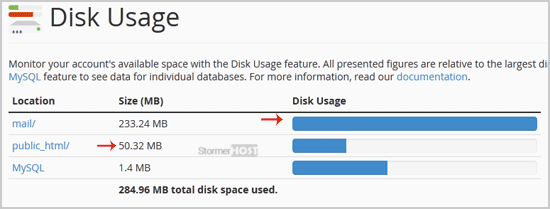
How to check the Bandwidth Usage?
1. In the Metrics section, click on Bandwidth. 
2. Here, you can check the bandwidth usage of your domain.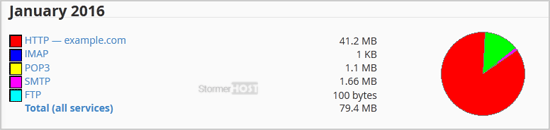
We hope this tutorial is helpful to you.
這篇文章有幫助嗎?
相關文章
How to Reset cPanel's Account Password
If you have access to your cPanel account, follow these steps to reset your password: 1. Log in...
If you have access to your cPanel account, follow these steps to reset your password: 1. Log in...
How to Update cPanel Contact Information and Receive Resource Limit Notifications
If you want to receive a notification on reaching your disk quota, bandwidth usage limit or wish...
If you want to receive a notification on reaching your disk quota, bandwidth usage limit or wish...
How to Change cPanel's Style/Theme
Switching over to another cPanel theme with a different style is easy.1. Log in to your cPanel...
Switching over to another cPanel theme with a different style is easy.1. Log in to your cPanel...
How to Change the Language of Your cPanel Account
cPanel supports many languages. If you want to change your cPanel language to a native one, you...
cPanel supports many languages. If you want to change your cPanel language to a native one, you...
How to Upload Files via the cPanel File Manager
You can use cPanel's built-in file manager instead of an FTP program to manage your website...
You can use cPanel's built-in file manager instead of an FTP program to manage your website...
