
Bilgi Bankası
How to Edit a File in the cPanel File Manager Bu dökümanı yazdır
You can use cPanel's built-in file manager to edit files on your website.
1. Log in to your cPanel account.
2. In the Files section, click on File Manager.
3. Navigate to the directory where your file is located.
4. Right-click on the file. Then click on Edit or HTML Edit in the Context Menu. 
5. In the HTML Editor window, click on Edit.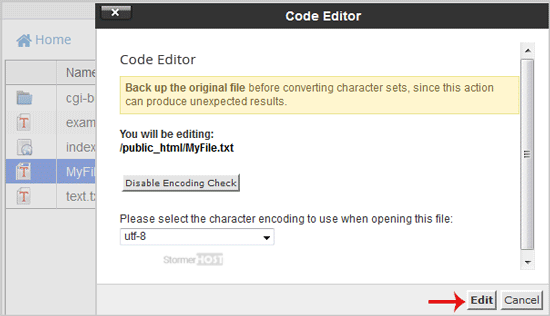
6. Make changes to the file, then click Save.
Your file has been successfully edited.
Bu cevap yeterince yardımcı oldu mu?
İlgili diğer dökümanlar
How to Reset cPanel's Account Password
If you have access to your cPanel account, follow these steps to reset your password: 1. Log in...
If you have access to your cPanel account, follow these steps to reset your password: 1. Log in...
How to Update cPanel Contact Information and Receive Resource Limit Notifications
If you want to receive a notification on reaching your disk quota, bandwidth usage limit or wish...
If you want to receive a notification on reaching your disk quota, bandwidth usage limit or wish...
How to Change cPanel's Style/Theme
Switching over to another cPanel theme with a different style is easy.1. Log in to your cPanel...
Switching over to another cPanel theme with a different style is easy.1. Log in to your cPanel...
How to Change the Language of Your cPanel Account
cPanel supports many languages. If you want to change your cPanel language to a native one, you...
cPanel supports many languages. If you want to change your cPanel language to a native one, you...
How to Upload Files via the cPanel File Manager
You can use cPanel's built-in file manager instead of an FTP program to manage your website...
You can use cPanel's built-in file manager instead of an FTP program to manage your website...
