
Base de Conhecimento
How to Update cPanel Contact Information and Receive Resource Limit Notifications Imprima este artigo
If you want to receive a notification on reaching your disk quota, bandwidth usage limit or wish to update the cPanel's contact information, follow these steps.
1. Log in to your cPanel account.
2. In the Preferences section, click on Contact Information.
3. Add or update your primary email address to receive account notifications and password reset confirmations. You can optionally add a secondary email address.
4. Enter your cPanel password and click Save. 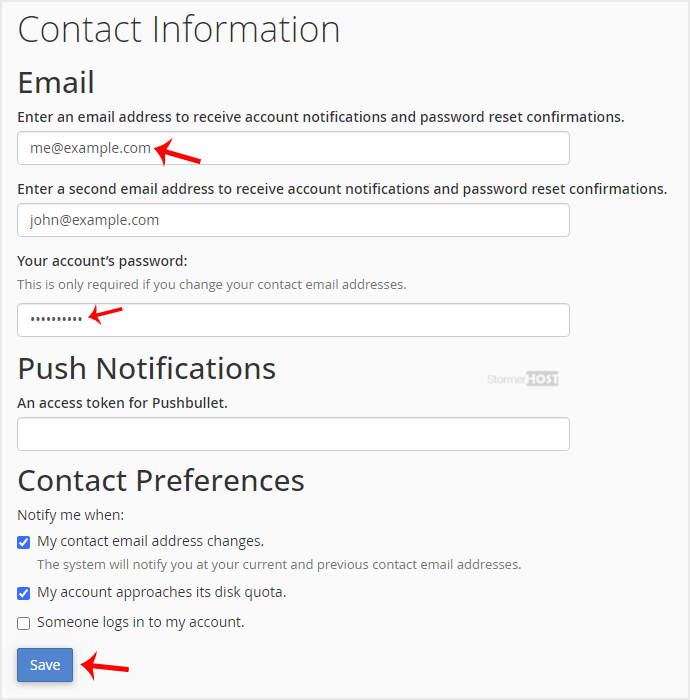
Your email address has been updated.
Esta resposta foi útil?
Artigos Relacionados
How to Reset cPanel's Account Password
If you have access to your cPanel account, follow these steps to reset your password: 1. Log in...
If you have access to your cPanel account, follow these steps to reset your password: 1. Log in...
How to Change cPanel's Style/Theme
Switching over to another cPanel theme with a different style is easy.1. Log in to your cPanel...
Switching over to another cPanel theme with a different style is easy.1. Log in to your cPanel...
How to Change the Language of Your cPanel Account
cPanel supports many languages. If you want to change your cPanel language to a native one, you...
cPanel supports many languages. If you want to change your cPanel language to a native one, you...
How to Upload Files via the cPanel File Manager
You can use cPanel's built-in file manager instead of an FTP program to manage your website...
You can use cPanel's built-in file manager instead of an FTP program to manage your website...
How to Create a New Folder or Files in the cPanel File Manager
cPanel File Manager is handy for managing your website files. 1. Log in to your cPanel...
cPanel File Manager is handy for managing your website files. 1. Log in to your cPanel...
