
Wissensdatenbank
How to Restore Partial Backups in cPanel Artikel drucken
You can easily restore a cPanel partial backup. Please, note that restoring such a backup will overwrite your existing data.
1. Log in to your cPanel account.
2. In the Files section, click on Backup Wizard.
3. Under Backup/Restore, click on Restore. 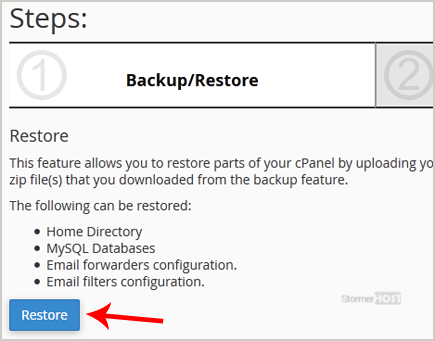
4. Under Select Restore Type, choose the appropriate option.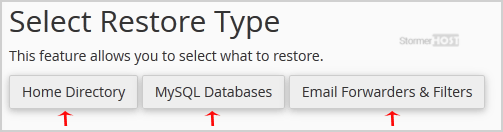
5. Click on Browse. Select the backup file from your computer and click on Upload. 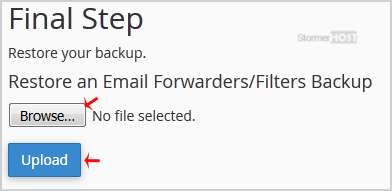
It should display a message that your restore has been successful.
War diese Antwort hilfreich?
How to Download Backup of Home Directory, MySQL, or Email Only
Backing up is important, and you should do it regularly. Follow this tutorial to make a full...
Backing up is important, and you should do it regularly. Follow this tutorial to make a full...
How to Generate and Download a Full Backup of Your cPanel Account
Backing up is important, and you should do it regularly. Follow this tutorial to make a full...
Backing up is important, and you should do it regularly. Follow this tutorial to make a full...
How to Generate a cPanel Backup and Send it to FTP
Backing up is important, and you should do it regularly. 1. Log in to your cPanel account....
Backing up is important, and you should do it regularly. 1. Log in to your cPanel account....
