
Base de conocimientos
How to Download Backup of Home Directory, MySQL, or Email Only Imprimir este artículo
Backing up is important, and you should do it regularly. Follow this tutorial to make a full backup of your website with cPanel.
1. Log in to your cPanel account.
2. In the Files section, click on Backup Wizard.
3. Under Backup or Restore, click on Back Up.
4. Under Select Partial Backup. choose one of the available backup options to create and download a backup of it. To download a Home Directory backup, click on Home Directory. 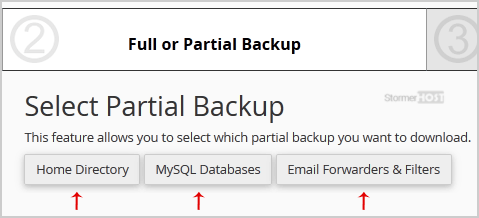
5. Confirm by clicking on Home Directory again.
Now, the download will start.
¿Le ha resultado útil esta respuesta?
Artículos relacionados
How to Generate and Download a Full Backup of Your cPanel Account
Backing up is important, and you should do it regularly. Follow this tutorial to make a full...
Backing up is important, and you should do it regularly. Follow this tutorial to make a full...
How to Restore Partial Backups in cPanel
You can easily restore a cPanel partial backup. Please, note that restoring such a backup will...
You can easily restore a cPanel partial backup. Please, note that restoring such a backup will...
How to Generate a cPanel Backup and Send it to FTP
Backing up is important, and you should do it regularly. 1. Log in to your cPanel account....
Backing up is important, and you should do it regularly. 1. Log in to your cPanel account....
