
Base de connaissances
How to Generate and Download a Full Backup of Your cPanel Account Imprimer cet article
Backing up is important, and you should do it regularly. Follow this tutorial to make a full backup of your website with cPanel.
1. Log in to your cPanel account.
2. In the Files section, click on Backup.
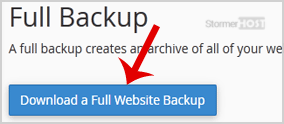
3. Under Full Backup, click on Download a Full Website backup.
4. From the drop-down menu, select Home Directory as the backup destination and enter your email to receive a notification when the backup is complete.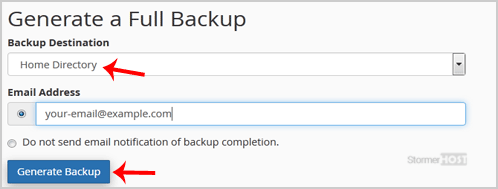
Leave Include integration links as it is.
After the cPanel backup is finished, you will receive a notification. You can download backups from Backup > Download a Full Account Backup.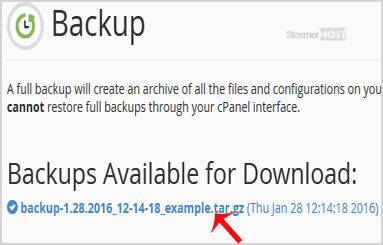
Cette réponse était-elle pertinente ?
Articles connexes
How to Download Backup of Home Directory, MySQL, or Email Only
Backing up is important, and you should do it regularly. Follow this tutorial to make a full...
Backing up is important, and you should do it regularly. Follow this tutorial to make a full...
How to Restore Partial Backups in cPanel
You can easily restore a cPanel partial backup. Please, note that restoring such a backup will...
You can easily restore a cPanel partial backup. Please, note that restoring such a backup will...
How to Generate a cPanel Backup and Send it to FTP
Backing up is important, and you should do it regularly. 1. Log in to your cPanel account....
Backing up is important, and you should do it regularly. 1. Log in to your cPanel account....
