
StormerHost
  • 0 Shopping Cart
  • Home
  • Store
    • Browse All
    • Linux Shared Hosting
    • Windows Shared Hosting
    • WordPress Hosting
    • Linux Reseller Hosting
    • Windows Reseller Hosting
    • Linux Dedicated Servers -Unmanaged
    • Cloud Hosting
    • VPS Linux Hosting (USA)
    • Google Workspace
    • SSL Certificates
    • CodeGuard
    • SiteLock
    • SSL Certificates
    • Website Backup
    • Website Security
    • Professional Email
    • VPN
    • Register a New Domain
    • Transfer Domains to Us
  • Announcements
  • Knowledgebase
  • Network Status
  • Affiliates
  • Contact Us
  • More
  • Account
    • Login
    • Forgot Password?
  1. Portal Home
  2. Knowledgebase
  3. WordPress
  4. How to remove your post in WordPress?

  Categories

Backup/Restore
4
CloudLinux (cPanel)
10
cPanel - Control Panel
24
Databases
11
DNS - Nameservers
6
Domain Management
10
Email
17
FTP
9
Installing a Control Panel
6
Mail Filters & SPAM
8
Mobile
11
Others
3
Plesk
47
Security
10
Softaculous
76
SSL
5
WHM
18
WordPress
17

  Categories

  Support

My Support Tickets
Announcements
Knowledgebase
Downloads
Network Status
Open Ticket

How to remove your post in WordPress? Print

  • 0

You can remove your published or draft post in WordPress.


1. Login to your WordPress admin dashboard.


2. Under the dashboard menu, hover your mouse on Posts and then click on All Posts.
wp-first-time-all-post.gif


3. Choose the post you wish to remove, and the Trash option will appear, Click on it.
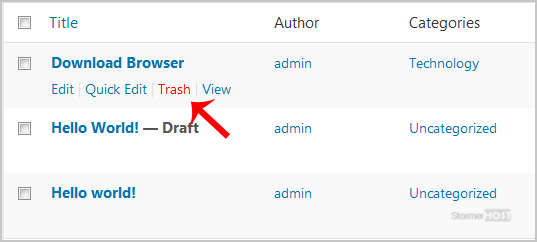
wp-removing-selected-post.gif

You will get a success message as 1 post moved to the Trash.


Was this answer helpful?

Related Articles

How to access the WordPress admin account? WordPress is a CMS software with an easy to access admin account and a simple to manage blog... How to Install a Plugin in WordPress? You can install a plugin in WordPress in several ways. The best way to install a plugin is to use... How to Manually Install a Plugin in WordPress? The automatic installation of a plugin is easy, and you can also install on manually. It will... How to Deactivate and Delete a Plugin in WordPress? If your plugin is not in use or you wish to deactivate it, you can do this from the WordPress... How to Forcefully Update a Plugin in WordPress? If your WordPress plugin is not working correctly or you want to re-install it even when it is...
« Back