
After purchasing our hosting account, you will receive a welcome email message from us. It will contain our nameservers, and you will need to update your domain nameservers to ours.
If your domain is registered on 123-Reg, you should follow this tutorial to update the Nameservers of your Domain to our Nameservers.
1. Open the 123-reg.co.uk website and click on Control Panel. It will show you a login form.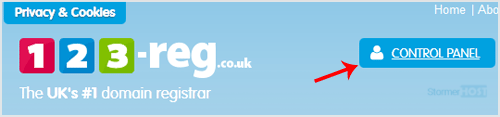
2. Enter the username and password of your 123-reg account and click the Log-in button.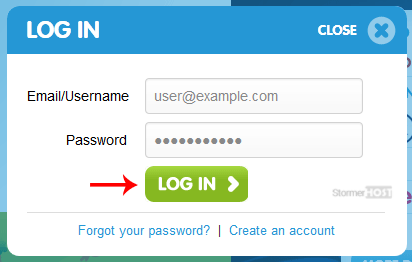
3. After a successful login, select the appropriate domain from the dropdown list and then click the Manage button.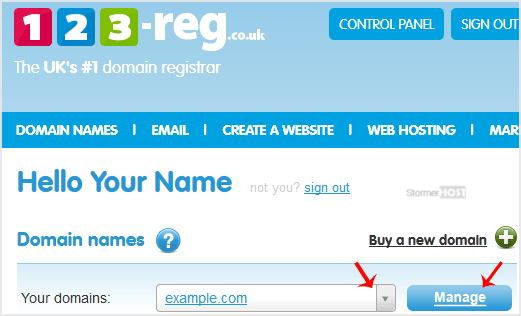
4. Scroll down to the Advanced domain settings and click on Change Nameservers (DNS).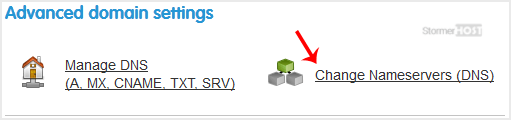
5. Enter your Nameservers in field 1 and field 2 and click on Update.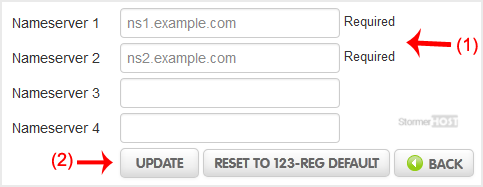
You will see a success message.
Note: It may take anywhere from 12 to 24 hours for the changes to take effect worldwide.
- Home
-
Store
- Browse All
- Linux Shared Hosting
- Windows Shared Hosting
- WordPress Hosting
- Linux Reseller Hosting
- Windows Reseller Hosting
- Linux Dedicated Servers -Unmanaged
- Cloud Hosting
- VPS Linux Hosting (USA)
- Google Workspace
- SSL Certificates
- CodeGuard
- SiteLock
- SSL Certificates
- Website Backup
- Website Security
- Professional Email
- VPN
- Register a New Domain
- Transfer Domains to Us
- Announcements
- Knowledgebase
- Network Status
- Affiliates
- Contact Us
-
More
