
BoxTrapper requires all email senders who are not on your whitelist to reply to a verification email before you receive their mail. This protects your inbox from spam.
If you want to get rid of unwanted emails, then you can enable this on all your emails or only on selected emails, and you need to configure BoxTrapper.
1. Login to your cPanel Account,
2. In the Email section, click on the BoxTrapper Icon.

3. From the BoxTrapper Page, you can see a list of your emails under the Account tab and the status of BoxTrapper (enabled/disabled) under the Status tab. Click on the Manage link.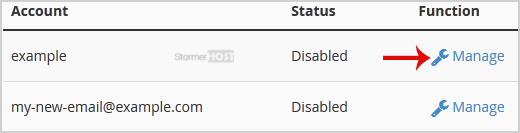
4. On the BoxTrapper Manage Page, if the current status is Disabled, click on the Enable button.
- Home
-
Store
- Browse All
- Linux Shared Hosting
- Windows Shared Hosting
- WordPress Hosting
- Linux Reseller Hosting
- Windows Reseller Hosting
- Linux Dedicated Servers -Unmanaged
- Cloud Hosting
- VPS Linux Hosting (USA)
- Google Workspace
- SSL Certificates
- CodeGuard
- SiteLock
- SSL Certificates
- Website Backup
- Website Security
- Professional Email
- VPN
- Register a New Domain
- Transfer Domains to Us
- Announcements
- Knowledgebase
- Network Status
- Affiliates
- Contact Us
-
More
